How to Fix Invalid Polygons: Self-intersections, Holes, and GeoJSON Gotchas
2026-02-17 · 10 min read · Polygons · GeoJSON · GIS · Topology · Data Quality · QGIS · PostGIS
TL;DR: Most “polygon problems” are really validity and coordinate issues. Validate in the system that will consume the geometry, repair topology (not just formatting), and re-check the result before you upload, order, or analyze.
Why polygons fail in the first place
Polygons feel simple until you use them in real pipelines: Clip a raster, compute an area, intersect an AOI (area of interest) with a catalog, or send GeoJSON to an API (application programming interface). That is where the cracks show. A polygon can render fine on a map and still be invalid in the geometry engine that actually runs the operation.
If you are ordering or downloading Earth observation data, polygon validity is not “nice to have”. It decides whether your request can be indexed, tiled, clipped, and billed consistently.
This article focuses on the problems that repeatedly break production workflows and what to do about them, without assuming you are a GIS specialist.
What valid geometry means and why tools disagree
When people say “invalid polygon”, they usually mean invalid according to Open Geospatial Consortium (OGC) Simple Features: The de facto rules implemented by many GIS libraries and spatial databases. OGC Simple Features: Part 1 Architecture
In that model: A polygon is defined by closed rings, holes must be inside the outer ring, and boundaries are not allowed to self-intersect in ways that make the interior ambiguous.
Tools can still disagree in practice because they use different geometry engines (for example, GEOS (Geometry Engine - Open Source) or JTS (Java Topology Suite)), different precision models, and different repair strategies. One system might accept a borderline polygon and quietly “fix” it, while another rejects it with a topology error. The most reliable way to avoid surprises is to validate in the same system that will consume the geometry, not just in the tool where you drew it.
PostGIS makes this explicit: ST_IsValid checks validity against the OGC rules, and ST_MakeValid attempts to repair invalid geometry, sometimes changing the geometry type when needed. PostGIS: ST_IsValid PostGIS: ST_MakeValid
Common polygon errors and what they look like
The same handful of issues account for most failures. If you are seeing errors like “ring self-intersection”, “hole lies outside shell”, “invalid coordinate”, or “topology exception”, start here.
| Problem | What you see in practice | Typical fix |
|---|---|---|
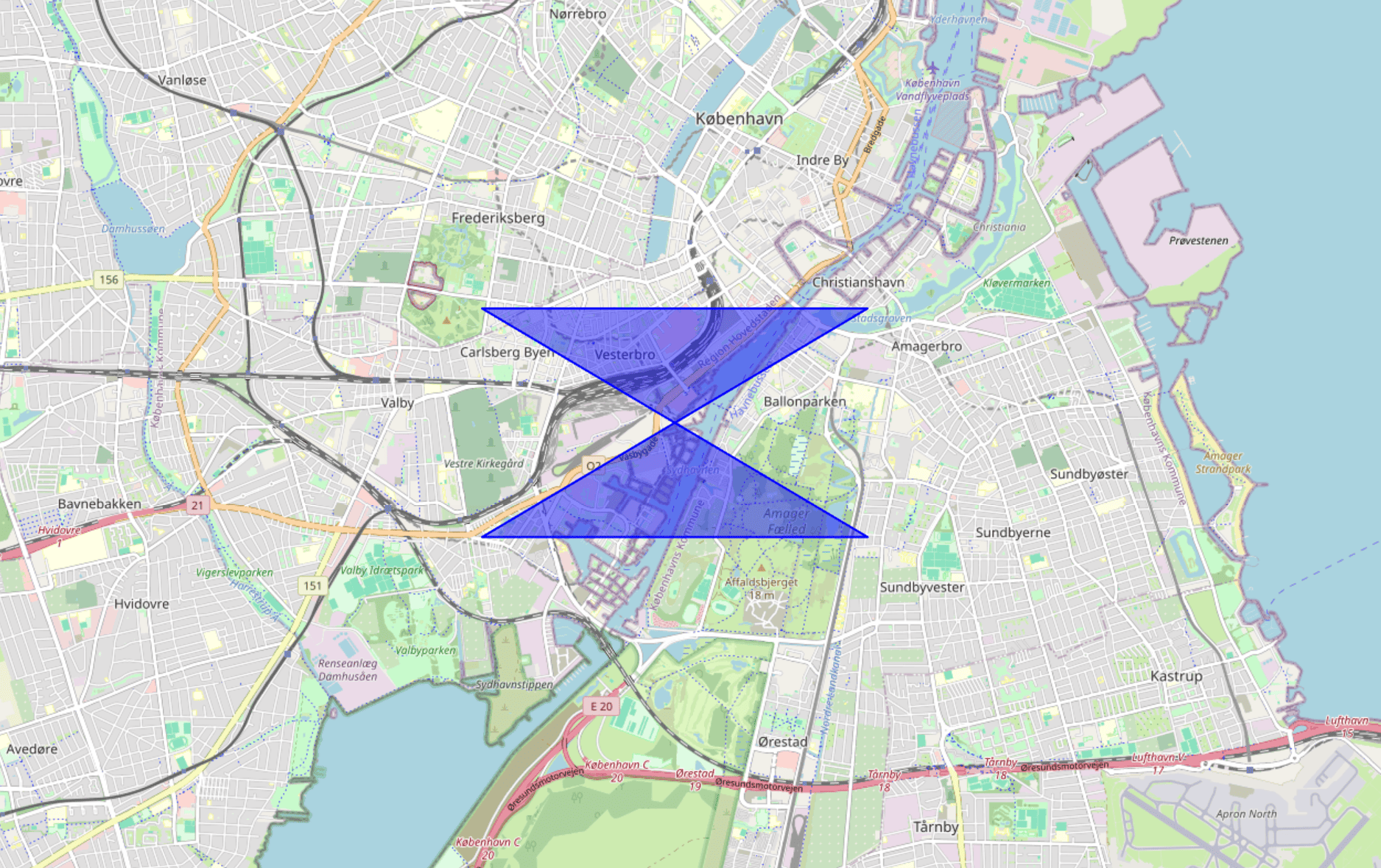
| Ring self-intersection | A “bow-tie” or figure-eight outline; intersections and area behave unpredictably | Run a topology repair (MakeValid, Fix Geometries). Expect a possible split into MultiPolygon |
| Hole outside shell | A hole ring that is not fully inside the outer ring | Delete or redraw the hole, or rebuild the polygon from clean parts |
| Unclosed ring | First and last coordinate differ | Close the ring and ensure the ring has enough vertices to form an area |
| Spikes and duplicate vertices | Tiny zigzags, zero-length edges, slow processing, odd slivers | Remove duplicates, snap to a grid, or simplify carefully with a small tolerance |
| Wrong coordinate reference system | Geometry appears in the wrong continent, or is astronomically large | Confirm CRS (coordinate reference system), reproject correctly, and store the CRS with the data |
| Antimeridian crossing | Geometry “wraps” across the world or creates a massive bounding box | Split at the antimeridian, or use dateline-aware handling in your GIS/database |
Here is a minimal self-intersection example in WKT (Well-Known Text). It often looks fine in a viewer but fails validity checks:
POLYGON((0 0, 2 2, 0 2, 2 0, 0 0))
A hole-outside-shell example is harder to spot by eye, but geometry engines usually reject it quickly:
POLYGON((0 0, 4 0, 4 4, 0 4, 0 0),(5 1, 6 1, 6 2, 5 2, 5 1))
A key point: Repairs are not purely cosmetic. The repaired output can legitimately differ from what you intended. A self-intersection repair can split one polygon into multiple parts, and some repairs drop collapsed pieces. PostGIS calls this out because it surprises people the first time they see it. PostGIS: ST_MakeValid
A practical repair workflow that usually works
There are many ways to fix polygons, but most successful workflows follow the same pattern.
- Validate in your target system: If the geometry will be used in a database or API, validate there first so you see the same error conditions.
- Normalize representation: Set the correct CRS, ensure rings are closed, and remove unsupported dimensions (many systems ignore Z anyway).
- Repair topology: Use a “make valid” style operation, then optionally simplify or snap if you have precision noise.
- Re-validate and sanity check: Confirm it is valid, then check that area, bounds, and shape still match your intent.
If you are using PostGIS, ST_IsValid tells you whether you have a problem, and ST_MakeValid is a common first repair step. PostGIS: ST_IsValid PostGIS: ST_MakeValid
If you are working in QGIS, the Geometry Checker plugin is designed for this: Detecting issues, locating them on the map, and applying fixes. QGIS Docs: Geometry Checker Plugin
GeoJSON and CRS gotchas that waste the most time
A huge share of “broken polygons” are actually “correct polygon, wrong coordinates”. GeoJSON is especially unforgiving because it assumes a specific CRS and axis order by default.
GeoJSON (RFC 7946) uses WGS 84 (World Geodetic System 1984) coordinates in decimal degrees, and positions are stored as longitude then latitude. If you accidentally send latitude then longitude, your geometry is still valid JSON, but geographically wrong. RFC 7946: The GeoJSON Format
In WKT terms, these two points swap meaning:
POINT(12.0 55.0)  -- lon, lat (typical for Copenhagen)
POINT(55.0 12.0)  -- lat, lon (wrong order for GeoJSON)
A second common issue is mixing projected coordinates (like meters in Universal Transverse Mercator (UTM)) into GeoJSON without reprojecting. Many web stacks and APIs interpret GeoJSON as lon-lat degrees. A polygon defined in meters can explode in size and fail downstream operations, or worse: It “works” but targets the wrong location.
If you are unsure, do a quick sanity check: Does the bounding box look like degrees (roughly between -180 and 180 for longitude, -90 and 90 for latitude)? If not, you likely have a CRS mismatch.
Tooling options: From quick fixes to full GIS workflows
When you need inspection and editing, a full GIS desktop workflow is usually best. QGIS is a strong default because it can validate, locate, and repair geometry problems interactively, and it is widely used across organizations. The Geometry Checker plugin is a good starting point when you need to understand why a polygon is failing, not just repair it blindly. QGIS Docs: Geometry Checker Plugin
For database-centric pipelines, PostGIS is hard to beat because it lets you validate and repair at scale, directly where the geometry will be used. ST_IsValid and ST_MakeValid are the core primitives for this style of workflow. PostGIS: ST_IsValid PostGIS: ST_MakeValid
If you only need quick conversions and common “make it valid” fixes, browser tools can be faster than opening a full GIS project. ClearSKY maintains a free polygon utility at polygon.clearsky.vision that runs in the browser, supports common conversions (WKT, GeoJSON, Shapefile, KML/KMZ), and includes basic operations like dissolve, buffer, and simplify. ClearSKY Polygon Tools Polygon Editor (Operations and Export)
If privacy matters, the tool can be used anonymously and is designed for browser-only workflows without uploads for most use cases. ClearSKY Polygon Tools: Privacy
Finally, if you are building application logic, libraries built on GEOS or JTS often expose similar operations (validity checks, snap, buffer, simplify). The same warnings apply: Repairs can change topology and sometimes produce multipart outputs.
What to check before you upload, order, or run analysis
These checks catch most failures before they become “mysterious API errors”.
- Confirm the geometry type is what your system expects (Polygon vs MultiPolygon).
- Confirm CRS and axis order, especially for GeoJSON lon-lat in WGS 84. RFC 7946: The GeoJSON Format
- Confirm there are no self-intersections and that holes are truly inside the outer ring. OGC Simple Features: Part 1 Architecture
- Confirm the bounding box and area are plausible for your use case before you rely on the result.
If you only do one thing, do the last one. A valid polygon in the wrong place is still a bad request.
Edge cases that deserve extra care
Some geometries are valid but still operationally risky.
Antimeridian and polar regions are classic examples. A polygon that crosses the antimeridian can look like a thin shape on a globe but become a massive wrap-around polygon in planar rendering or naive bounding-box logic. In these cases, splitting the AOI at the antimeridian is often safer than relying on implicit wrap handling.
Precision noise is another silent killer. A polygon traced from a raster boundary or imported from a low-quality CAD export may contain nearly identical points and tiny zigzags that are below your map resolution but above the engine’s numeric tolerance. Snapping to a grid or applying a very small simplification can stabilize validity and make downstream operations faster, but only if you re-check that you did not erase narrow real features like field margins or river corridors.
Finally, multipart results are not a failure. They are often the correct consequence of making an invalid polygon valid. If your pipeline assumes “one polygon in, one polygon out”, update it to accept MultiPolygon and GeometryCollection outputs, or filter to polygons with meaningful area depending on your application.
FAQ
What is the difference between an invalid polygon and a polygon in the wrong CRS?
An invalid polygon breaks geometry rules, typically OGC Simple Features validity, such as self-intersections or holes outside the shell. A wrong CRS polygon can be perfectly valid topologically but still appear in the wrong place or at the wrong scale. In practice, CRS mistakes often look like “invalid” because downstream systems reject the absurd bounds or fail spatial indexing.
RFC 7946: The GeoJSON FormatWill “make valid” always preserve the shape I drew?
No. Topology repair resolves ambiguities, and that can change the representation in meaningful ways. For example, fixing a self-intersection may split one polygon into a MultiPolygon, and collapses can produce lower-dimensional outputs. Treat repairs as transformations that must be validated and sanity checked, not as a guaranteed “cleaning step”.
PostGIS: ST_MakeValidHow do I quickly test if my polygon is valid in PostGIS?
Use ST_IsValid(geom) to check validity against OGC rules, and investigate invalid cases before relying on spatial operations. If you need to repair, ST_MakeValid(geom) is a common next step, followed by re-validation and a bounds or area check. This approach scales well because it runs directly in the database where your analysis and APIs often live.
What is the best way to fix polygon issues in QGIS?
Start by validating and locating errors so you understand what is wrong, not just that something failed. QGIS includes tools and plugins that can check geometry issues and offer repair actions while showing the error locations on the map. This is especially useful when you need to decide whether to redraw or accept an automated fix.
QGIS Docs: Geometry Checker PluginWhy do APIs often fail on polygons that look fine on a map?
Map rendering is forgiving because it can draw lines even when topology is ambiguous. Spatial operations are strict because they need a well-defined interior to compute intersections, clipping, and areas consistently. That is why validity checks based on OGC rules matter, even if your polygon looks right visually.
OGC Simple Features: Part 1 Architecture